








Youth Shield Youth Shield
Youth Shield

Protect all teens from the misuse of electronic devices and the Internet

Guides, videos and alerts that help young people and their families stay safe on social media, games and every app they use.

21+
Guides
22+
Videos
7+
Reports
3+
Users
18+
Awareness
27+
Posts
20+
Features

Latest Posts

The latest articles in cybersecurity

Platform Guides

Learn how to protect your accounts on any platform

Security Awareness

All topics →

Latest Features

All features →

International Reports

In-depth reports you can download

Security

Deepfake Voice Scams Explained: When a Familiar Voice Isn't Real

Deepfake voice scams use AI tools to imitate how a person sounds, so a call or voice message can seem to come from a friend, relative or teacher when it doesn't. Scammers often add urgency, claiming there is an emergency, a secret or a need for quick money, so the target panics instead of checking. Young people can be reached through calls, voice notes and messages on social apps, and may also be pressured to share one-time codes or account details. The best defence is simple: pause, hang up, and call the person back on a number you already know. A family code word, plus caution about posting clear voice clips publicly, makes these scams much harder to pull off.

S By Shoxan Ali
Security

Fake Login Pages: How One Tricked Click Can Hand Over a Social Account

Many stolen accounts start with a fake login page. A teen gets a message, often from a friend's hacked account, saying "Is this you in this video?" or "Log in to claim your free reward." The link opens a page that looks exactly like Instagram, TikTok, Discord, Roblox or Snapchat, but anything typed into it goes straight to the attacker. Parents can help by sitting down with their kids and showing how to check the web address before logging in, never typing a password after clicking a link in a chat, and opening the app or typing the site address manually instead. Turning on two-step verification and using a different password for every account limits the damage if someone does get fooled, and teens should know they can tell a parent right away without being punished.

S By Shoxan Ali
News

Fake Game Links and Chats: How Roblox and Minecraft Accounts Get Stolen

Many young gamers lose their accounts not because of advanced hacking, but because they click a fake link or trust a stranger in chat. Scammers pretend to offer free Robux, rare skins, game mods or "support" help, then send kids to a copycat login page that quietly collects their username and password. Once the thieves have the login, they can lock the owner out, take items, and try the same password on social media and email. Parents can help by sitting down with their children to explain that real games never ask for passwords in chat, turning on two-step verification, and using a different password for every account. If a child has already entered details on a suspicious page, the safest move is to change the password immediately, sign out of all devices, and tell a trusted adult without fear of punishment.

S By Shoxan Ali
book 4
Security

book 4

S By Shoxan Ali

News & Alerts

Latest threats and protection methods

Sextortion Scams: Don't Let a Stranger Pressure You With Private Photos

Critical Youth Shield By Youth Shield

Scammers often pose as someone your age on social media or gaming chats, build trust quickly, and then push you to share private photos. Once they have one, they threaten to send it to your friends, family or followers unless you pay or send more. This is a form of blackmail, and the shame it causes is exactly what criminals rely on to keep victims silent. It is never your fault, and help is available.

Solutions

Be wary of new online contacts who move fast, flatter you, or quickly ask to switch to a private chat. Never send private images to someone you only know online, even if they seem friendly or send photos first. If you are being threatened, stop replying, do not pay, and keep screenshots, usernames and messages as evidence. Tell a trusted adult right away and report and block the account on the platform. Contact local police or a child protection helpline in your country for support, because you will not be in trouble.

Snap Map Privacy: Check Who Can See Where You Are Right Now

Medium Youth Shield By Youth Shield

Snapchat's Snap Map can show your location to friends, and if your friends list includes people you barely know, that information can be misused. Strangers, fake accounts or someone with bad intentions could learn where you live, study or hang out. Location sharing is easy to forget about, so you may be visible without realising it.

Solutions

Open Snap Map settings and turn on Ghost Mode so your location is hidden from everyone. If you do share, choose only a few close friends you know in real life instead of all friends. Remove or block anyone on your friends list you don't actually know. Avoid posting Snaps that show your home, school uniform or regular hangout spots. Review your location settings every few weeks, and tell a trusted adult if someone asks where you are.

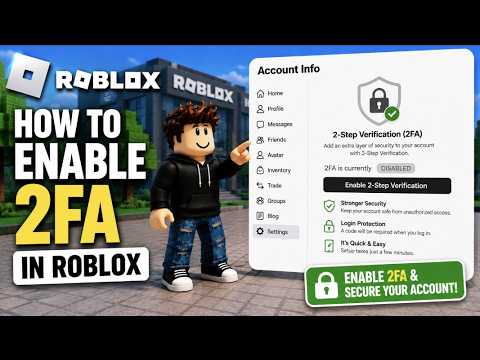
Two-Factor Authentication Made Simple: Add a Second Lock to Your Accounts

Medium Youth Shield By Youth Shield

A password alone is often not enough, because passwords can be guessed, reused or stolen in phishing attacks. Two-factor authentication (2FA) adds a second step, such as a code from an app, so a hacker with your password still can't get in. Scammers know this, so they often pretend to be support staff or friends and ask you to read out your login code. Anyone who gets that code can take over your account.

Solutions

Turn on 2FA for email, gaming, social media and school accounts, starting with your email. Choose an authenticator app or a security key over text-message codes when you can. Never share a login code with anyone, even if they say they are support or a friend. Save your backup codes somewhere safe and offline, not in a screenshot on your phone. If you get a code you didn't request, change your password straight away and check your account's recent activity.

Telegram Fake Job Scams: When a "Simple Task" Offer Is a Trap

High Youth Shield By Youth Shield

Scammers message teens on Telegram, or add them to group chats, offering easy online jobs such as liking posts, rating products or completing "tasks" for quick pay. They may show fake proof of other people being paid, then ask you to deposit your own money, share ID documents or hand over account details to "unlock" earnings. In the end the payments stop, the money is gone, and your personal information may be used for fraud or to pull you into moving money for criminals.

Solutions

Never pay money upfront for a job. Real employers do not ask you to deposit funds to start working. Treat unexpected job offers from strangers or unknown groups as suspicious, however friendly or professional they sound. Do not send ID photos, bank details or passwords to anyone you only know through chat. Ignore "proof" screenshots and testimonials, because they are easy to fake. Leave the chat, block and report the account in Telegram, then tell a parent, guardian or teacher you trust.